How to withdraw your Vinted Balance to your bank account
Your sales land in your Vinted Balance. Here is how to move that money to your bank account, what can slow it down, and what to do when it does not arrive.
Add your bank account under Settings, then Payments. Open your Vinted Balance and press Withdraw to bank account. Only the available balance can be withdrawn, not the pending one. Vinted says a withdrawal can take up to 5 business days to reach your bank.
Where your money is: your Vinted Balance
Every sale is paid into your Vinted Balance. You open it from your profile icon, then Balance. It is provided by two payment providers, Mangopay and Vinted Pay. You can spend the money on Vinted or withdraw it to your bank account. Source: Activate your Vinted Balance
You need to activate it before you sell. Vinted asks for your full name, nationality, date of birth and address. Enter your real details, because a made-up name or incorrect details can stop the activation. Activate it before or during your first sale, or the order may be cancelled automatically. Source: Activate your Vinted Balance
If you did not do it in advance, Vinted's identity page says to do it within 5 working days of your first sale, and before you send the item. Source: Why you may be asked for your ID
If your first name, last name or date of birth is wrong later, you cannot edit it yourself. Contact Vinted's support team. Source: Activate your Vinted Balance
Pending and available: which money you can take out
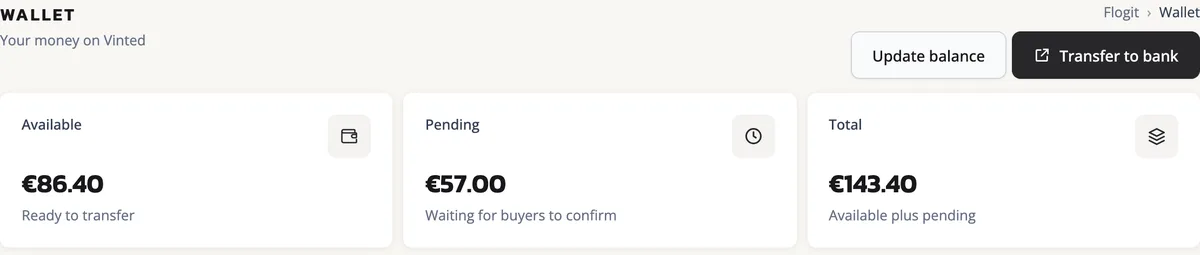
A payment from a buyer shows as pending. The payment provider holds it until the order is complete. For most sellers, the order completes when the buyer presses Everything is OK, or when a problem is raised and resolved. The buyer has 2 days after Vinted tells them the item should have arrived to press Everything is OK or raise a claim. Once the order is complete, the money moves to your available balance within 2 days. For Pro sellers, the buyer has 14 days instead, and the order completes on its own if the buyer reports no issue. Source: Pending balance
Only the available balance can go to your bank. Funds that are still pending cannot be withdrawn. Source: Withdraw your earnings
Say you sold a 15 EUR dress yesterday, and it has not been delivered yet. The 15 EUR stays pending, so you cannot withdraw it yet.
Step by step: from your balance to your bank
Add your bank account
Press your profile icon, then Settings, then Payments. Under Withdrawal options, press Add bank account. Enter your full name as it appears on your bank account, your account number with no spaces, and your billing address. Then save. Source: Add your withdrawal details
Check the money is available
Check that the amount you want is in your available balance. Only earnings from completed orders can be withdrawn. Source: Withdraw your earnings
Press Withdraw to bank account
Open your Vinted Balance and press Withdraw to bank account. A withdrawal cannot be cancelled once it has started. Source: Money withdrawal issues
Follow it in your history
Go to Vinted Balance, then History, and pick the year. Each withdrawal shows the amount, the date and time it started, the bank account (partly hidden), and the date it arrived or is expected to arrive. Source: Withdraw your earnings
What your bank account must look like
A small mistake in your bank details can make a withdrawal fail. These are Vinted's rules:
- Enter your IBAN or account number as one piece, with no spaces.
- The account holder's name must exactly match the verified identity on your Vinted Balance.
- Each bank account can be linked to one Vinted profile only. You cannot use the same account for two Vinted accounts.
- Your bank and your Vinted account must use the same currency. On the euro sites, such as vinted.ie and vinted.fr, that means euros, to a bank in the EU or EEA. On vinted.pl it means złoty, to a bank in Poland. In the UK it means pounds, to an account with an account number and sort code.
To help prevent fraud, Vinted's payment providers may check that the account matches the details you gave. You see whether they match when you add the account or start a withdrawal. Source: Add your withdrawal details
Why Vinted may ask for your ID
Payment providers must follow anti-money laundering rules, so they need to know who their users are. This check is called KYC, for "Know Your Customer". Mangopay does the main check. In some markets, Vinted Pay does it instead. Source: Why you may be asked for your ID
Mangopay may ask for a document when you reach a withdrawal limit, or when your activity looks suspicious. Vinted Pay may also ask when you activate your Vinted Balance, or when a single withdrawal is 1,000 EUR or more, or the same amount in your currency. Source: Why you may be asked for your ID
The document can be an ID card, a passport or a driving licence. Vinted Pay can also ask for a residence permit or a selfie. In rare cases you may be asked for a bank statement or proof of address. Photos must be clear, show both sides where needed, and not be expired. Source: Why you may be asked for your ID
While the check is open, your withdrawals are paused, and the providers may restrict you from withdrawing or using your earnings. Source: Add your withdrawal details and Why you may be asked for your ID
We would send a clear photo the same day you get the request. The sooner it is checked, the sooner your withdrawals start again.
How long it takes, the minimum and the currency
A withdrawal can take up to 5 business days to reach your bank. Business days are Monday to Friday, not counting weekends and bank holidays. Source: Withdraw your earnings
The withdrawal help page does not mention a charge for withdrawing. Check the app before you take money out, in case that changes.
| Where you sell | You withdraw in | Smallest withdrawal |
|---|---|---|
| Euro countries, such as Ireland and France | Euros, to a bank in the EU or EEA | 0.10 EUR |
| Poland | Polish złoty (PLN), to a bank in Poland | 0.10 PLN |
| United Kingdom | Pounds, to an account with an account number and sort code | 0.10 GBP |
You cannot withdraw to an account in another currency. Sources: Withdraw your earnings, Withdraw your earnings (Poland) and Withdraw your earnings (UK)
The currency and the banks you can use depend on your country. Check the help page of the Vinted site you sell on.
If your withdrawal is late or fails
First, check your bank statements from the day you started the withdrawal up to today. The payment may not show the name Vinted. It can show as Vinted Pay, Adyen, Mangopay or Leetchi. Source: Money withdrawal issues
If the money has not arrived after 5 business days, contact Vinted. Log in, press Contact us at the end of the help page, and say when you started the withdrawal. Attach screenshots of your bank statement that show every incoming payment from that date to today. The statement must show your full name, your account number, your bank's address and code, and the date. You can hide other details and amounts that are not related. Source: Money withdrawal issues
If the money went to a closed or non-existent account, it comes back to your Vinted Balance within 14 calendar days. If it went to an account that is not yours, it may come back within 15 business days. Source: Money withdrawal issues
A failed withdrawal leaves the money in your Vinted Balance. The reasons Vinted gives include an amount below the 0.10 minimum, an account name that does not match your Vinted Balance, an account already linked to another profile, and spaces or wrong characters in the number. Fix the details, then try again. Source: Money withdrawal issues
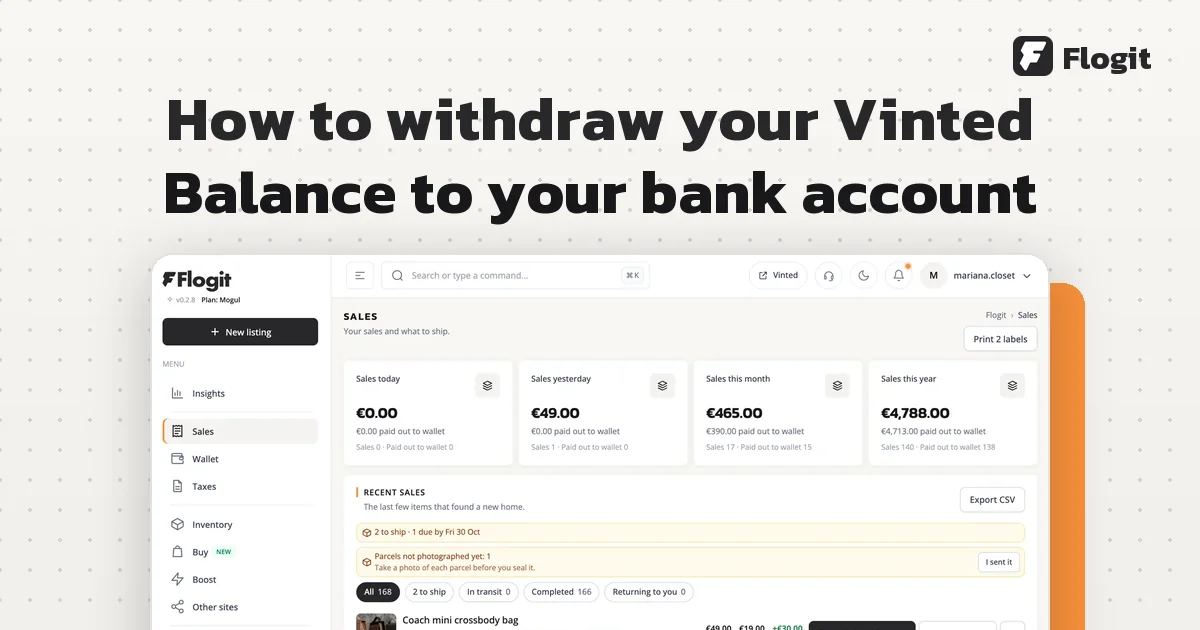
Flogit shows a "Paid out to wallet" date in each sale's details. It is the day Vinted completed the order. Until then, the sale says "Not paid out yet". You can see it in the sales tracker.